Creating New Workspaces
Creating New Workspaces in Orion 🚀
Creating a new workspace in Orion is a straightforward process. Follow these steps to set up your new collaborative environment.
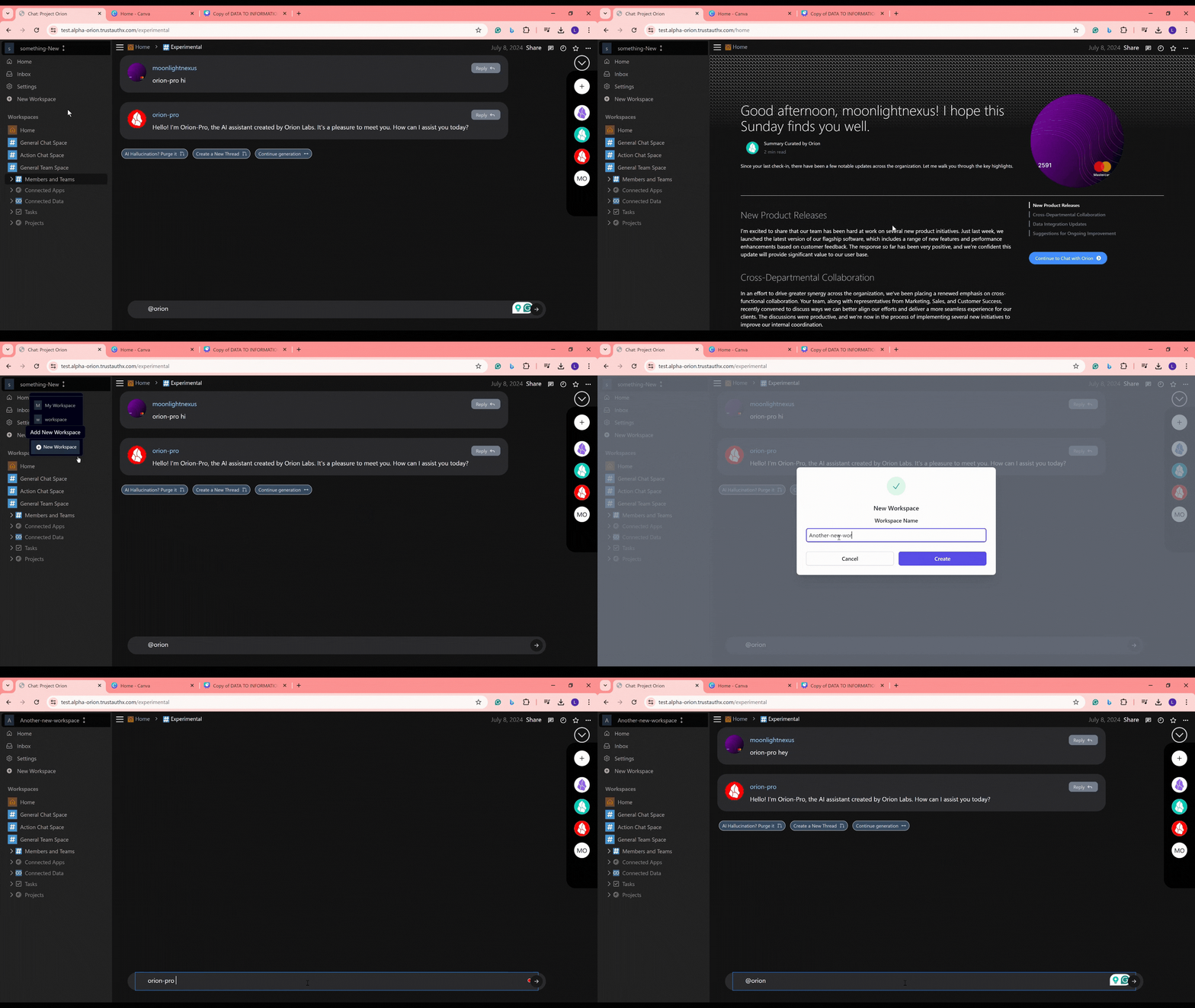
Two Methods to Create a Workspace
➕
Sidebar Method: Quick and easy access from the main interface.
Tips for Effective Workspace Creation
- Choose a descriptive name that reflects the purpose or project of the workspace.
- Consider who needs access when setting up a new workspace.
- Organize your workspaces to improve team productivity and project management.
Troubleshooting
🚧
If you encounter issues while creating a new workspace:
- Ensure you have the necessary permissions to create workspaces.
- Check your internet connection if the process seems to stall.
- Refresh the page and try again if the buttons are unresponsive.
- Contact your Orion administrator or our support team for persistent problems.
By following these steps, you can easily create new workspaces in Orion, facilitating better organization and collaboration for your team's projects. Happy workspace creation! 🌟